Fleet Management.
TX-E devices can report back to a live dashboard once you switch monitoring on, so you always know what's online, what needs an update, and what needs attention, wherever it's deployed.
Open Fleet DashboardBuilt in, not bolted on
Fleet Management is TX-E's remote monitoring dashboard: enable it and link a device to your account, and it starts reporting what's online, what's not, and what firmware it's running, across every site you manage.
It's built for anyone with devices somewhere they can't easily get to: a back paddock, a leased shed, a site three hours away, where a problem shouldn't have to wait for the next visit to be noticed.
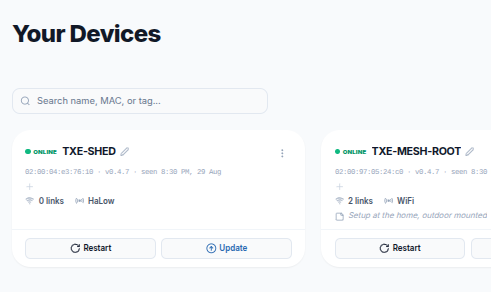
What you can do from the dashboard
Everything you'd otherwise need a site visit for.
Live Status
See which devices are online, offline, or reconnecting, in real time, across every site.
Remote Firmware Updates
Push updates to any device without needing to physically get to it, no site visit required.
Automation Rules
Set a rule for what happens if a device has been offline too long, from a simple alert to automatically restarting another device to try and bring it back online.
Organise With Tags
Group and filter devices by site, role, customer, or however makes sense for how you work.
Built for devices you can't always get to
If you're managing a single Connect and Roam pair at home, you'll rarely need more than the setup app. Fleet Management earns its keep once devices are spread across a property, or across several: a farm with multiple remote paddocks, an installer checking that a customer's units are online whenever a question comes in, a contractor deploying kit at client sites, or anyone who can't just walk out and check on a device in person.
Instead of finding out something's down when someone calls to say the WiFi's not working, you see it the moment it happens, and in many cases, fix it without leaving your desk.
Know Before You're Told
Set an offline threshold and get notified automatically if a device drops off the network, so a problem out on the property doesn't sit unnoticed until someone happens to be there.
Open Fleet DashboardSupport & Information
Find answers to your questions or get in touch with our team.